
If you're a TikTok Shop seller based in the EU, you can easily expand your sales to other European countries. TikTok Shop offers a feature called Sell Across EU, which helps you reach customers in multiple EU markets with minimal setup.
This guide explains how the feature works and how you can use it to create European listings in M2E TikTok Shop Connect for Adobe Commerce (Magento).
What is “Sell Across EU” #
This feature is part of TikTok's EU Global Selling strategy to simplify cross-border commerce within the European Union. Here's how the “Sell Across EU” works:
- If you already have a TikTok Shop in one EU country (your source shop), you can also start selling in other EU countries where TikTok Shop operates.
- You don’t need to register new seller profiles. One account gives you access to multiple markets.
- Orders, listings, and support can be managed from your Seller Center dashboard.
There’s no lengthy approval process. As soon as your TikTok source shop is active, you’re eligible to open shops in other EU markets.
How to set up Sell Across EU (TikTok Global Selling) #
To become a TikTok global seller and activate this feature in your Seller Center:
- Confirm your contact name and update the warehouse address for your source shop.
- Choose available shipping methods (TikTok logistics or your own delivery setup).
- Add your bank information. In some cases, you may need to upload a bank statement for verification.
Once that’s done, you can begin publishing your products to other EU shops.
⚠️ All new EU shops go through a New Shop Probation phase. During this period, there are limits on the number of products and order volume. Once your main shop meets the graduation criteria, all your shops will “graduate” together, and these limits will be removed.
What can you Sell Across EU #
You can sell the same product categories you already offer in your source EU shop. However, some categories are currently not allowed for “Sell Across EU”.
Restricted in all EU5 countries:
- Food & Beverage
- Food Supplements
- Jewellery
- Baby & Maternity
Restricted in Germany and France:
- Books (due to national regulations)
ℹ️ If you're selling in a restricted category, you may need to request approval through TikTok's application process. Before listing, always check the latest TikTok Shop Global and EU Prohibited and Restricted Products Policies.
How to create EU listings in M2E TikTok Shop Connect #
With M2E Connect, you can list a product once and offer it across multiple TikTok Shop EU markets from your Adobe (Commerce) Magento admin. There is no need to recreate listings from scratch for each region.
Here’s how to do it:
1) Go to Listings > Items in M2E Connect and list Magento products on your main (source) TikTok EU Shop via M2E.
At this step, you set up pricing and selling settings, description, images, and product category. These details will serve as the base for all other European listings.
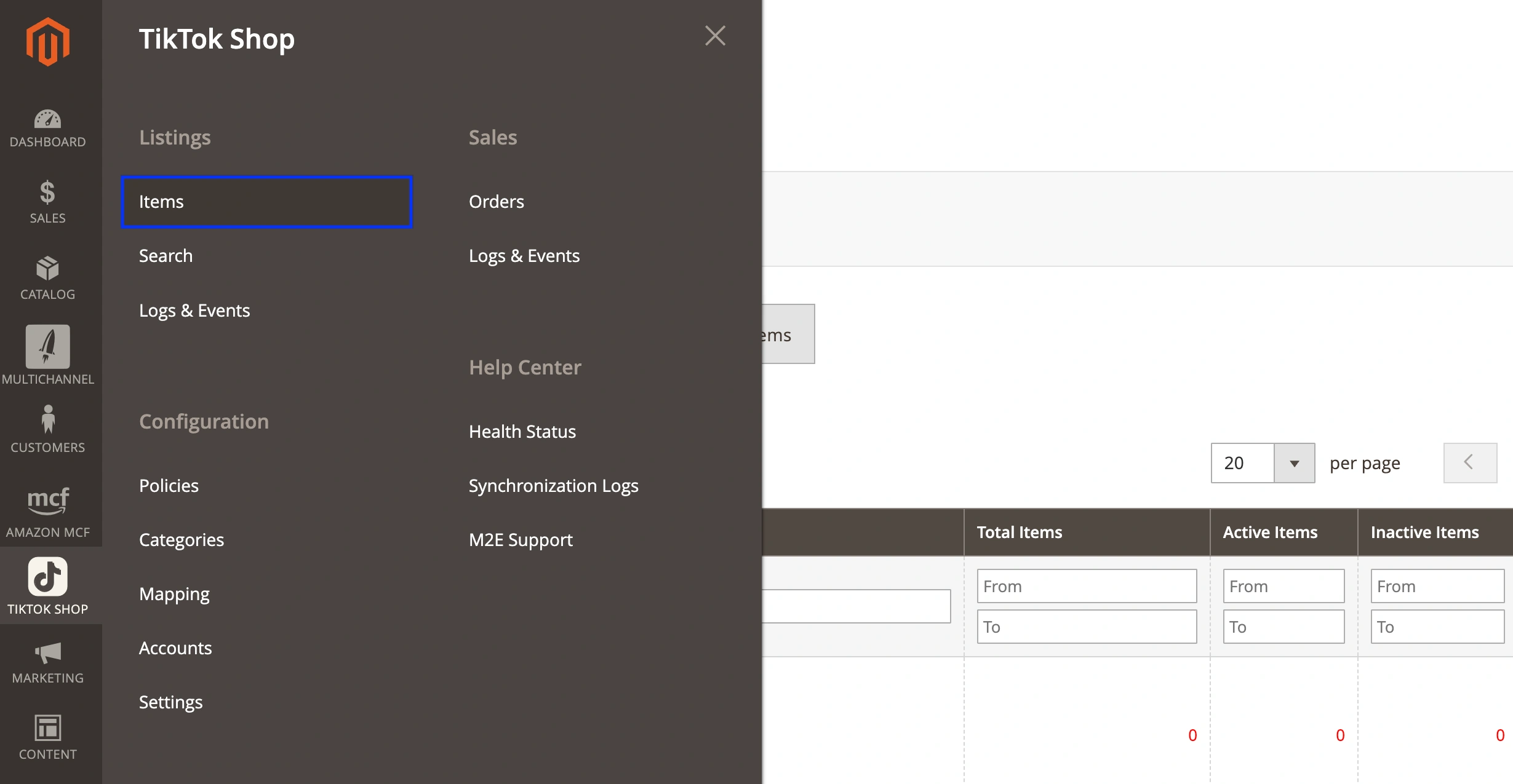
2) Open the M2E TikTok Shop Listing that contains the listed products.
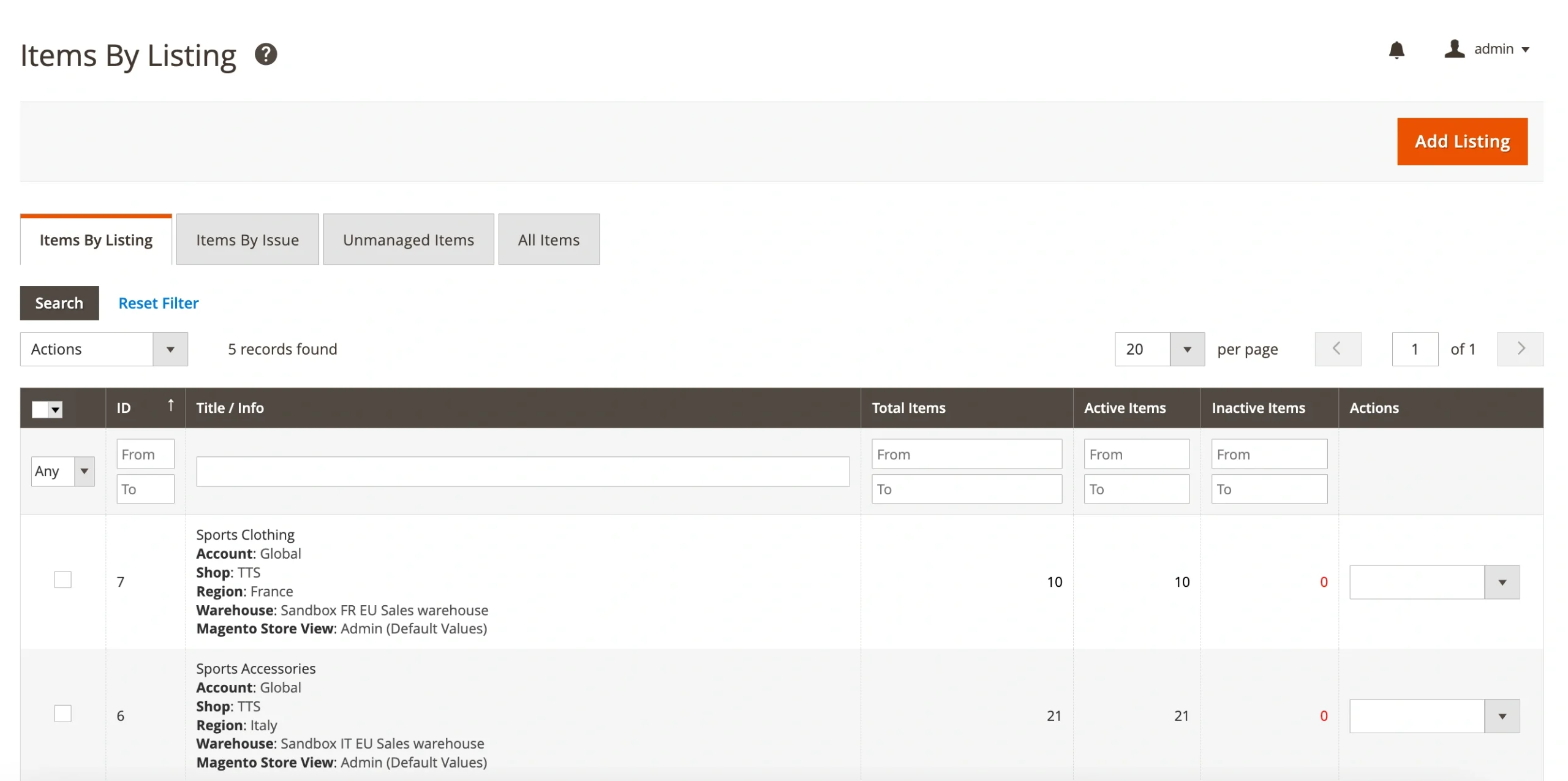
3) Select the products you want to offer on other EU markets (Germany, France, Italy, Spain, etc.).
4) Submit the Sell on Another Market mass action. This duplicates the items and prepares them for other regions.

5) Click List Item(s) to publish the products in the selected markets.
You can choose an existing M2E TikTok Shop Listing for that region or create a new one, depending on how you prefer to organize your catalog.

Once submitted, M2E Connect automatically sends the product to the new market:
- The listing is automatically translated into the local language.
- The correct local product category is assigned based on your original item.
ℹ️ TikTok Shop moderates translated listings. Make sure your original product information meets TikTok’s listing policies to avoid rejections in the destination countries.
Shipping and returns in the EU #
As part of TikTok Global Shipping, the marketplace supports flexible shipping and returns for EU sellers.
Shipping options:
- Ship by TikTok Shop – Use TikTok’s approved logistics partners.
- Ship by Seller – Handle fulfillment yourself or through a third-party provider, for example, Amazon MCF.
Return options:
- Return by TikTok Shop – TikTok provides the buyer with return instructions.
- Return by Seller – You or your logistics partner manage the return process.
ℹ️ Some product types (like heavy or hazardous items) can only be returned using the seller’s own method, not TikTok’s.
Support and seller services #
Each EU country where TikTok Shop is active offers local-language support. Also, messages from customers are automatically translated into your source shop’s language. You can respond confidently, no matter where your buyers are located.
✅ If you have any questions about using the Sell Across EU feature in M2E Connect, please reach out to our support team. We’re here to make your TikTok global selling experience smooth and successful.


