
The Help Center section provides immediate access to the most relevant information regarding your instance and synchronization processes.
Health Status #
The Health Status tool is designed to monitor your system's performance. It runs automatically at predefined intervals and diagnoses key processes within your M2E OnBuy Connect application.
For instance, it verifies whether your server's GMT time matches the GMT time configured in your app, checks that order synchronization runs smoothly, and more. The tool identifies potential system issues and alerts you for timely prevention and resolution of problems.
Dashboard #
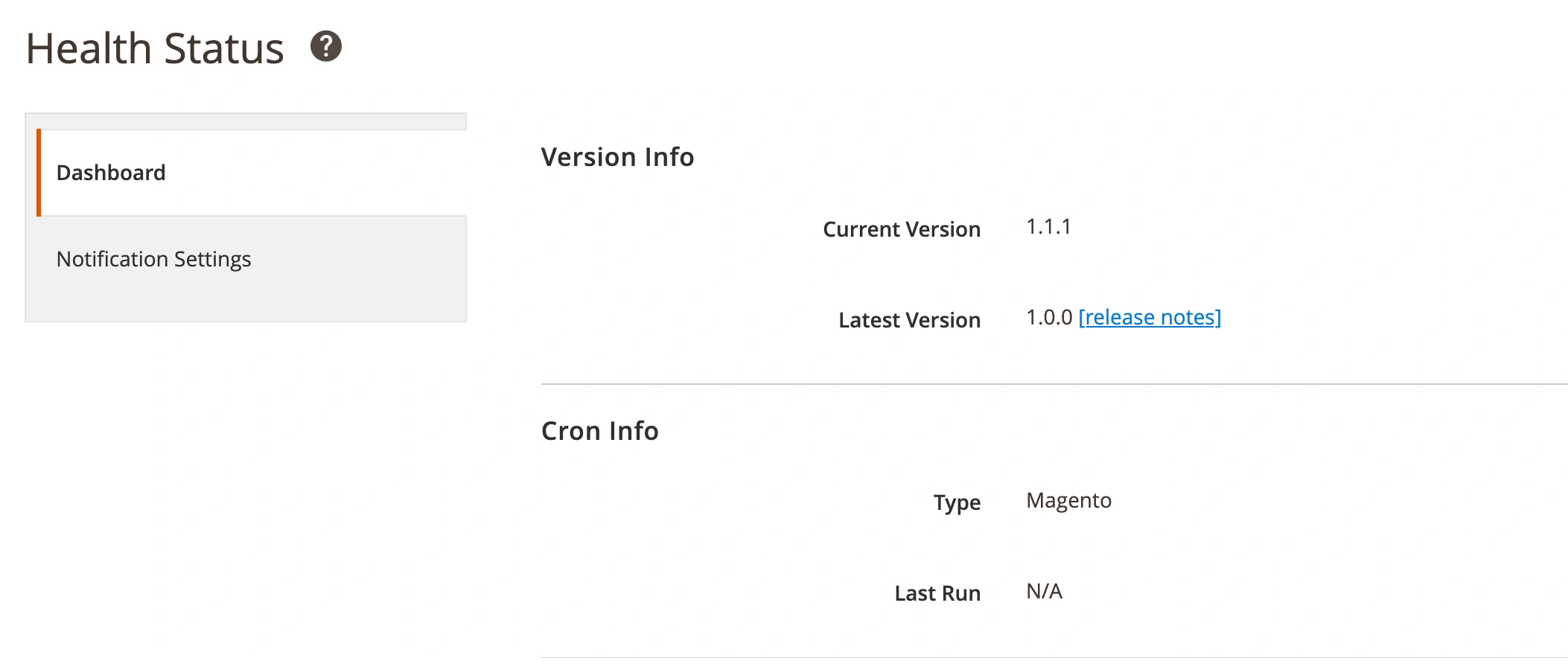
The Dashboard page displays technical details about your M2E OnBuy Connect instance, including the current version and Cron information.
Notification Settings #
This section allows you to configure notifications to stay informed about critical events in your M2E OnBuy Connect.

Specify how you want to be notified about Health Status updates in M2E OnBuy Connect:
- Do Not Notify – No notifications will be sent.
- On each Extension Page (default) – Notifications will appear on every M2E OnBuy Connect page.
- On each Magento Page – Notifications will be displayed on every Magento page.
- As Magento System Notification – Notifications will use Magento's global messaging system.
- Send me an Email – Notifications will be emailed to the address you provide.
Choose the minimum level of notifications:
- Critical/Error (default) – Notifications for critical issues and errors only.
- Warning – Notifications for errors and warnings.
- Notice – Notifications for errors, warnings, and notices.
Synchronization Logs #
This page lets you track issues that arise during synchronization of OnBuy Listings, Orders, and Unmanaged Listings.

ℹ️ Synchronization logs are only recorded when an error, warning, or fatal error occurs.
Use the filters at the top of the grid to find errors related to specific integrations or synchronization processes.
M2E Support #
If you have questions or cannot find a solution in the available resources, use this section to contact the M2E support team.


